Would You Pay for Invoicing Software That Improves Workflow
Would you pay for invoicing software that fits your workflow? Learn when it is worth paying, what features matter, and how to choose the right tool.
Sending invoices from a Word document or chasing payments over email is a slow and unreliable process. Clients pay late. Reminders get buried. Tax time becomes a retrieval exercise across three different folders. Invoicing software exists to close that gap.
This guide covers what invoicing software does, which features matter, how the top tools compare in 2026, and the pricing realities that review sites typically understate.
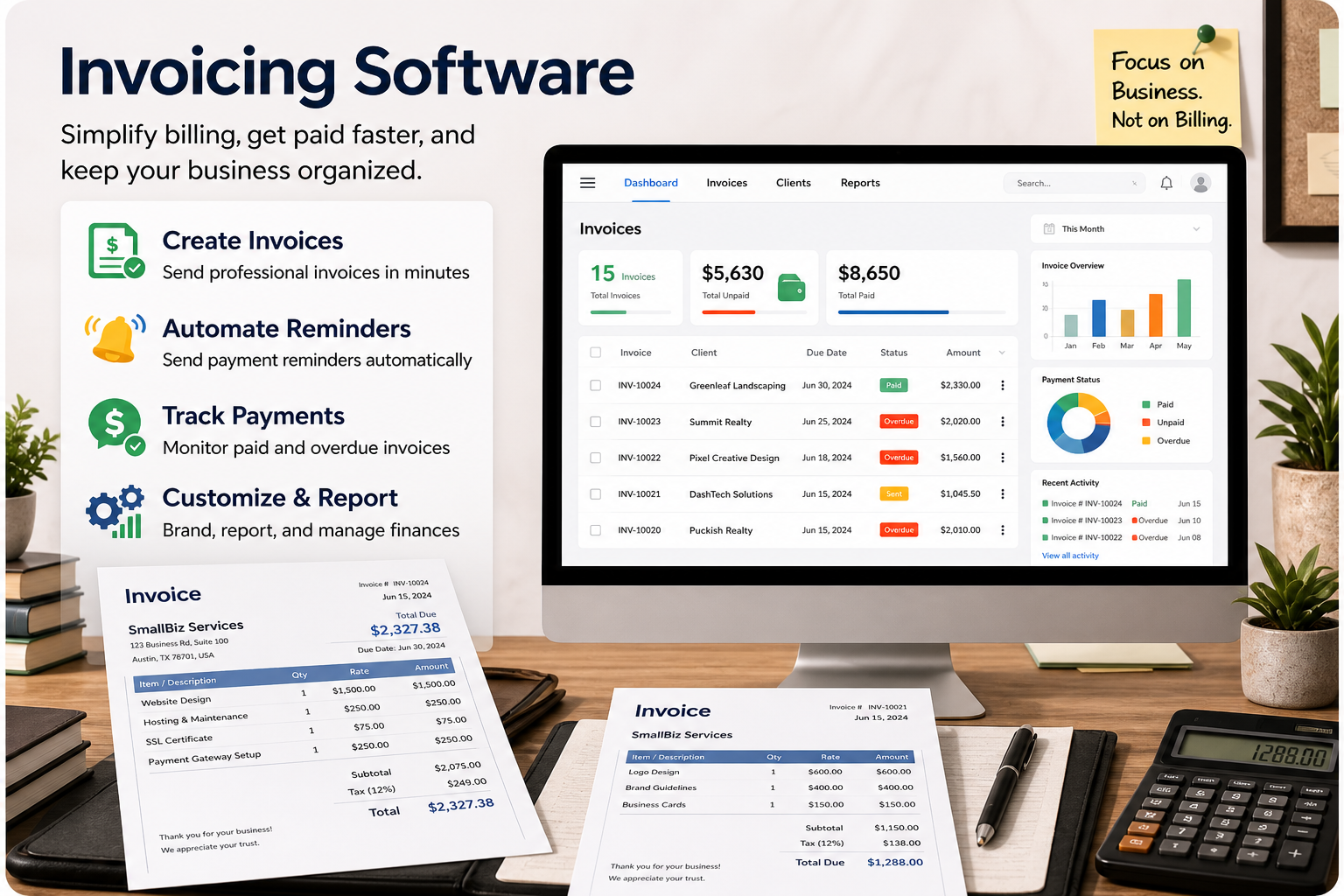
Invoicing software is a platform that automates the creation, delivery, tracking, and collection of payment for client work. It replaces manual methods, whether paper, Word templates, or spreadsheets, with a system that can generate a professional invoice in under a minute, accept online payment, send automatic reminders for overdue amounts, and sync the whole transaction with your accounting records.
The critical distinction from a general accounting tool is focus. Invoicing software is built around the outgoing-invoice workflow: create, send, get paid, reconcile. Platforms like QuickBooks and Xero include invoicing as one module among many. Dedicated invoicing tools like Zoho Invoice and Invoice Ninja do invoicing only, but they tend to do it better for that narrow use case.
Not every tool covers every capability. These are the features worth verifying before you commit to a paid plan:
• Customizable invoice templates. Your logo, brand colors, payment terms, and tax fields should be configurable. A generic-looking invoice does not project the same confidence as a branded one.
• Recurring and automated billing. Clients on retainer or subscription arrangements should not require a manual invoice each cycle. Auto-billing with cards on file eliminates that friction entirely.
• Automated payment reminders. The tool should send overdue reminders on a schedule you define, without you composing individual follow-up emails. Some platforms (FreshBooks, Square) also charge automatic late fees.
• Online payment acceptance. Credit card, ACH/bank transfer, Apple Pay, and Google Pay should all be supported. ACH is substantially cheaper: typically 1% versus 2.9% plus $0.30 for cards.
• Estimates and quotes with conversion. A single click converting an approved estimate into an invoice eliminates re-entry and removes a common source of billing errors.
• Time and expense tracking. Essential for service businesses billing hourly. Harvest and FreshBooks handle this better than most general invoicing tools.
• Tax calculation. US sales tax by state, VAT for EU and UK clients, GST for Canadian, Australian, and Indian clients. Multi-jurisdiction tax is genuinely difficult; verify how the tool handles your specific obligations before assuming it works.
• Accounting integration. At minimum, the tool should sync with QuickBooks or Xero if that is what your bookkeeper or accountant uses. Replacing that sync with manual export and re-import defeats much of the purpose.
• Client portal and invoice tracking. Clients should be able to view, download, and pay from a link. You should know when they opened it.
• Mobile app. Sending an invoice from a job site or client meeting requires a functional mobile experience. Zoho Invoice and FreshBooks have the strongest mobile apps in the category.
The tools below appear at the top of every credible review and practitioner discussion in 2026. Pricing shown is the standard monthly rate for the entry paid tier; most platforms offer 20 to 50 percent off the first few months.
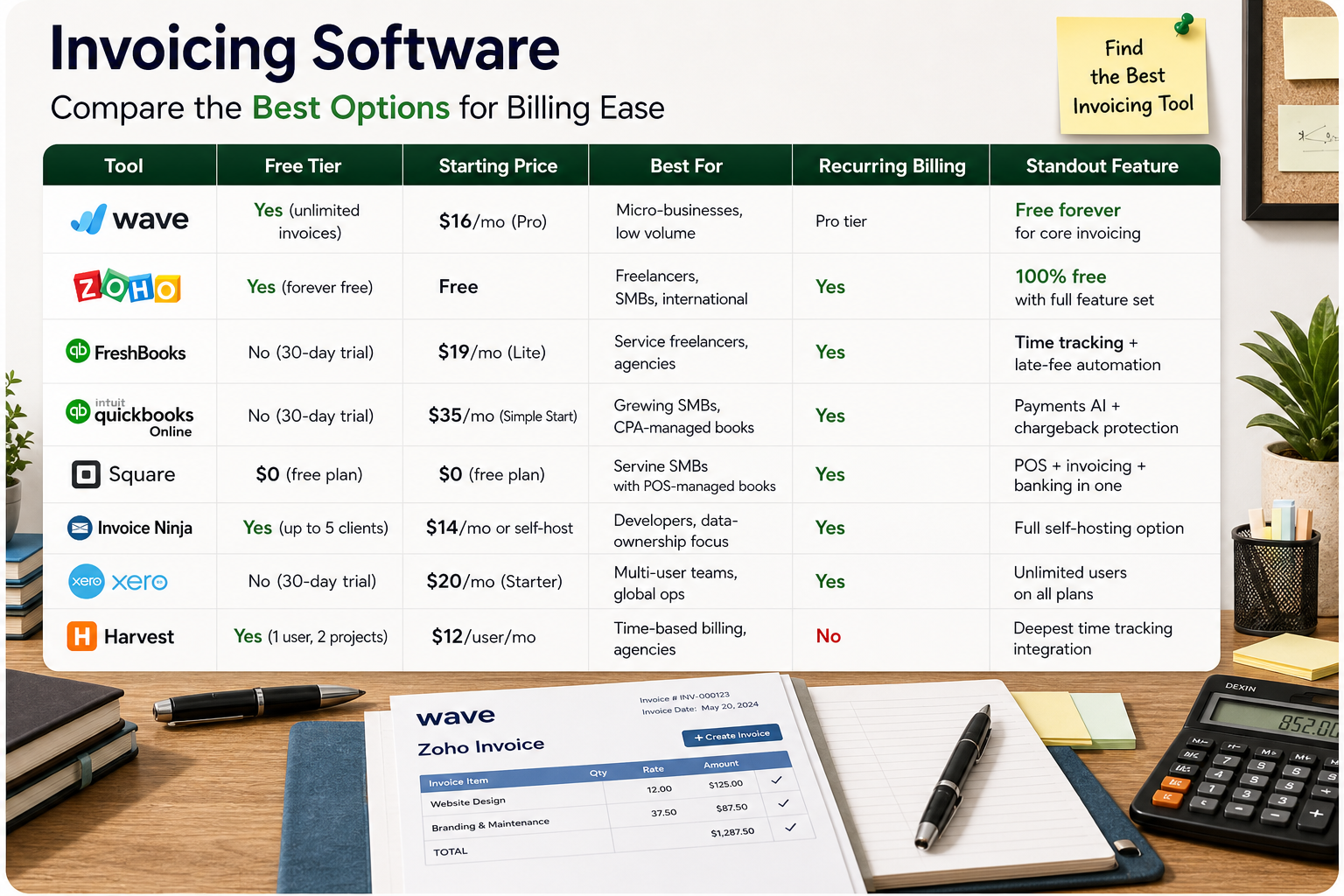
Tool | Free Tier | Starting Price | Best For | Recurring Billing | Standout Feature |
|---|---|---|---|---|---|
Wave | Yes (unlimited invoices) | $16/mo (Pro) | Micro-businesses, low volume | Pro tier | Free forever for core invoicing |
Zoho Invoice | Yes (forever free) | Free | Freelancers, SMBs, international | Yes | 100% free with full feature set |
FreshBooks | No (30-day trial) | $19/mo (Lite) | Service freelancers, agencies | Yes | Time tracking + late-fee automation |
QuickBooks Online | No (30-day trial) | $35/mo (Simple Start) | Growing SMBs, CPA-managed books | Yes | Payments AI + chargeback protection |
Square Invoices | Yes | $0 (free plan) | Service SMBs with POS needs | Yes | POS + invoicing + banking in one |
Invoice Ninja | Yes (up to 5 clients) | $14/mo or self-host | Developers, data-ownership focus | Yes | Full self-hosting option |
Xero | No (30-day trial) | $20/mo (Starter) | Multi-user teams, global ops | Yes | Unlimited users on all plans |
Harvest | Yes (1 user, 2 projects) | $12/user/mo | Time-based billing, agencies | No | Deepest time tracking integration |
Zoho Invoice or Wave. Zoho Invoice is permanently free with no client cap, strong mobile apps, and multi-currency support. Wave's core invoicing is also free, though bank imports and some automations now require the $16/month Pro plan. Either handles the typical freelancer workload without a monthly fee.
FreshBooks or Harvest. FreshBooks combines time tracking, expense logging, project profitability, and client-facing invoicing in one platform. Its automated late-fee charging and overdue reminders are the most capable in this segment. Harvest is the better choice if billable hours are the primary billing unit and you want deep Asana or Basecamp integration.
Square Invoices. Square connects POS, invoicing, and banking into a single ecosystem. If you already take card payments through Square hardware, adding invoicing costs nothing and keeps cash flow reporting consolidated.
QuickBooks Online or Xero. Both are the default in professional accounting. QuickBooks dominates in the US; Xero is preferred by most accountants outside North America. If your CPA specifies one, use it. The AI-assisted features in QuickBooks 2026 (Payments AI, auto-matching, chargeback protection) meaningfully reduce manual reconciliation for businesses billing more than $50,000 per month.
Invoice Ninja (self-hosted). Invoice Ninja can be installed on your own server at no ongoing cost. The self-hosted version gives you full control over client data, integrations, and uptime. The migration from v4 to v5 was rocky, but the v5 platform is now stable and well-maintained.
Published starting prices rarely reflect what you will actually pay. Three things to verify before signing up:
1. Client caps. FreshBooks Lite covers 5 active clients. Exceeding that forces an upgrade to Plus at $33/month (50 active clients) or Premium at $60/month (unlimited). The $19 Lite plan is genuinely unusable for most agencies.
2. Per-user fees. FreshBooks charges $11 per additional user per month. QuickBooks Simple Start covers one user; Essentials covers three. Xero includes unlimited users on all plans, which is a meaningful cost advantage at even modest team sizes.
3. Payment processing fees. Card processing at 2.9% plus $0.30 per transaction is standard. ACH is typically 1%, sometimes capped. On a $5,000 invoice, that difference is $145 versus $50. Helcim offers the lowest published processing rates in the category with no monthly fee.
QuickBooks has raised prices substantially every year since 2020. Simple Start went from $25/month (2020) to $35/month (2026). Advanced went from $150 to $275 before any promotional discount. If cost predictability matters, note this trajectory before committing to an annual contract.
Wave moved bank imports from free to $16/month Pro in 2024. The free plan is still genuinely useful for low-volume invoicing, but the platform's reliability as a zero-cost solution is no longer unconditional.
Industry data consistently shows that more than 70 percent of freelancers experience late payments, with delays averaging around three weeks. For small service businesses, the figure is higher still. Software alone does not solve this, but the right settings reduce it materially.
Three settings that actually make a difference:
• Automated reminders set to go out 3 days before due, on the due date, and 7 days after. Most tools support this schedule; most users never configure it.
• Automatic late fees of 1.5 to 2 percent per month, disclosed in your contract and set up to apply without manual intervention. FreshBooks handles this natively. Square and QuickBooks support it with some configuration.
• ACH with a stored payment method so the client authorizes the charge upfront rather than initiating it themselves. Card-on-file billing shifts the collection burden from the client to the system.
If you are operating in New York, Illinois, Louisiana, or Columbus, Ohio, note that Freelance Isn't Free legislation requires written contracts and establishes penalties for late payment. Citing this statute directly in a follow-up communication has resolved disputes for freelancers faster than any software feature.
The terms are used interchangeably in most commercial contexts. Strictly speaking, invoicing refers to outgoing payment requests from a seller to a buyer. Billing can also refer to recurring subscription management or utility-style metered billing. Platforms like Chargebee and Recurly are subscription billing tools; platforms like FreshBooks and Zoho Invoice are invoicing tools. For most small businesses, the distinction does not matter.
Yes. Zoho Invoice is permanently free with no invoice or client cap. Wave's core invoicing remains free, though some automation features require the $16/month Pro plan. Invoice Ninja is free for up to 5 clients on the hosted plan and free indefinitely on self-hosted. Square Invoices has no monthly fee; you only pay the 3.3 percent plus $0.30 processing fee when a client pays by card.
Most tools allow you to configure tax rates by client location and apply them automatically to line items. US state sales tax is supported in varying degrees of automation; tools like Avalara and TaxJar offer dedicated tax calculation that integrates with most invoicing platforms for more complex multi-state obligations. VAT for EU clients and GST for Australian, Canadian, and Indian clients is handled natively in Zoho Invoice, Xero, and QuickBooks. Verify your specific jurisdiction before assuming the tool handles it correctly.
Yes, in measurable ways. Online payment links embedded in invoices eliminate the friction of manual bank transfers. Automated reminders reduce the number of invoices that simply get forgotten. Cards on file and ACH authorization shift collection from a client-initiated action to an automatic one. QuickBooks cites an average of four days faster payment when automated reminders are enabled. The gains are real, but they depend on configuring the tool rather than leaving defaults in place.
Zoho Invoice for most situations: permanently free, covers recurring billing, multi-currency, time tracking, client portal, and mobile. Wave if you plan to add bookkeeping in the same platform. Square if you take any in-person payments. All three have free plans with no time limit, which gives you room to evaluate without a billing commitment.
Most dedicated invoicing tools offer a QuickBooks Online integration that syncs invoices, payments, and client records. Square Invoices integrates natively. Wave connects via Zapier but has no direct native sync. Zoho Invoice has a bidirectional QuickBooks integration. If your accountant is already in QuickBooks, using QuickBooks Online's built-in invoicing is the path of least resistance, even if the standalone invoicing tools have better client-facing features.
Would you pay for invoicing software that fits your workflow? Learn when it is worth paying, what features matter, and how to choose the right tool.
What do you use to manage invoices and track payments? Compare tools, features, and simple ways to stay organized with the right invoicing software.
Find the best free invoicing software for freelancers and small businesses. Compare features, limits, and tools to manage invoices, payments, and clients.
Looking for invoicing software recommendation? Compare top tools, features, pricing, and use cases to manage invoices, payments, and clients with ease.