
Would You Pay for Invoicing Software That Improves Workflow
Would you pay for invoicing software that fits your workflow? Learn when it is worth paying, what features matter, and how to choose the right tool.
Consulting billing is not complicated in concept and genuinely difficult in practice. The core problem is time: time that goes unbilled because nobody logged it, time that triggers scope disputes when a client sees it on an invoice, and time that the consultant spends chasing a payment 90 days after the work was delivered. A 2024 practitioner survey cited in the Successful Independent Consulting community found that consultants lose an average of $10,000 per year to unbilled hours, uncollected invoices, and unreimbursed expenses. The right invoicing software eliminates a substantial portion of that loss.
This guide covers the specific billing workflows that management, IT, and strategy consultants need, how the main platforms compare, and which situations favour each tool.

A business meeting. Consulting billing is shaped by the client relationship: retainer agreements, milestone structures, and expense reconciliation all require invoicing tools that accommodate negotiated payment terms rather than standard Net 30 terms.
Consulting billing differs from product billing in several specific ways. Invoices are generated from time entries, expense receipts, or milestone completion rather than from a product catalogue. Retainer arrangements require monthly reconciliation: unused hours may carry over, be forfeited, or trigger a credit note. Clients frequently pay late, not through bad faith but because enterprise procurement processes have multiple approval layers. International clients introduce complications related to currency, VAT, and withholding. And the invoice itself needs to look professional enough to represent a firm charging $150 to $500 per hour.
The capabilities that address these realities are:
Time tracking integrated with invoicing. Hours logged should flow directly to the invoice with no re-entry. The best tools allow you to split billable and non-billable time by project and client.
Retainer billing and balance tracking. Monthly retainer invoices should auto-generate; unused hour balances should carry forward; true-up invoices for overages should be easy to produce.
Expense capture and reimbursement. Receipt scanning via mobile, mileage logging, and attachment of receipts to invoice line items are standard requirements for any consultant billing expenses.
Milestone and project-based invoicing. Fixed-fee engagements billed by project phase (kickoff, draft, final delivery) require milestone-based invoicing rather than time-based invoicing.
Multi-currency and international tax handling. US consultants billing EU or UK clients face VAT reverse-charge obligations; those billing Canadian clients face GST/HST; those billing with withholding agreements need documentation support.
White-labelled client portal. A client portal on your own domain, where clients view, approve, and pay invoices, is a significant credibility signal at $ 250-per-hour rates.
Automated payment reminders. Enterprise clients with slow AP departments respond to polite, automated reminders at 7, 14, and 30 days overdue. Manual chasing is both inefficient and uncomfortable.
Compare the best invoicing software for consultants based on pricing, billing features, and client management tools.
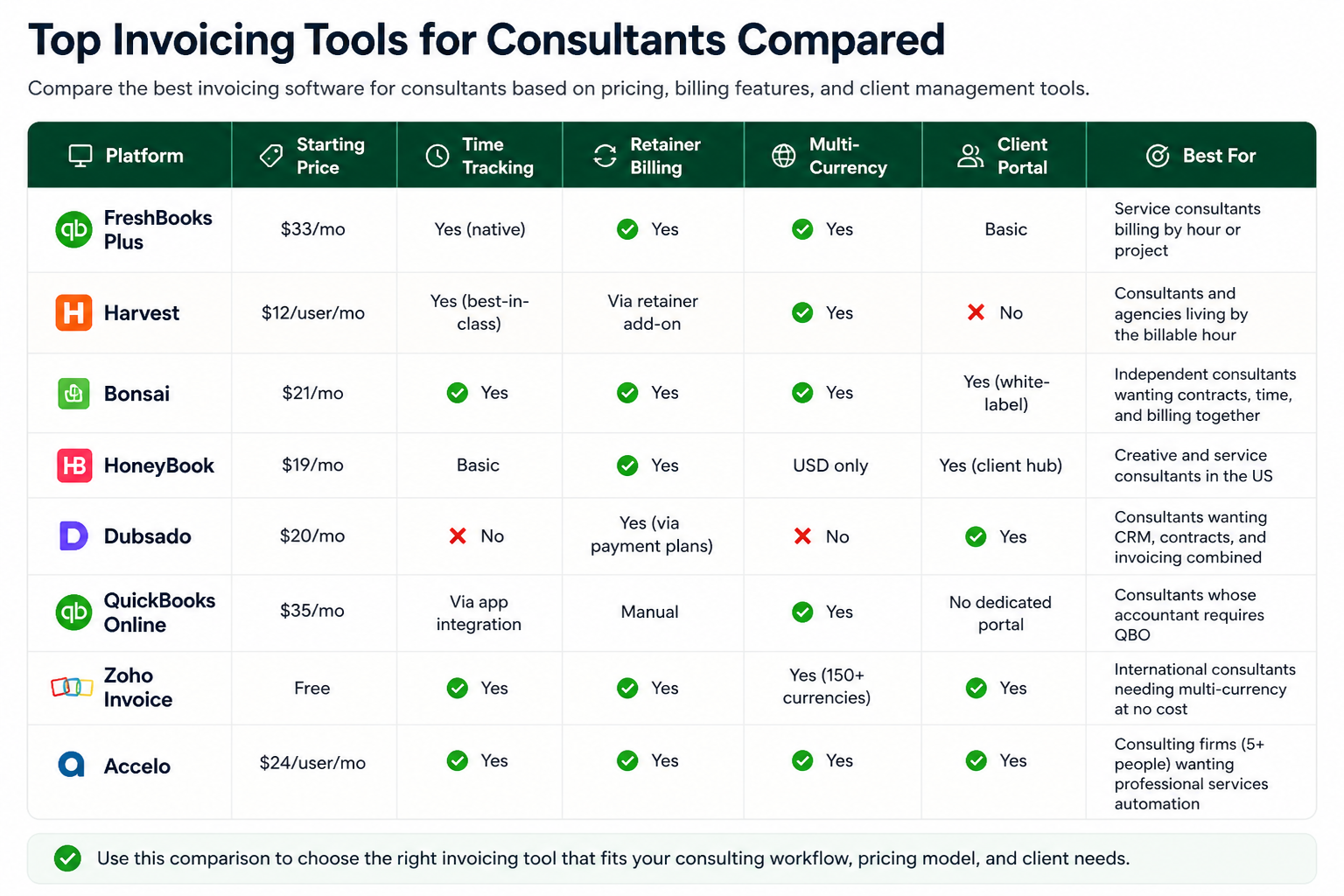
Platform | Starting Price | Time Tracking | Retainer Billing | Multi-Currency | Client Portal | Best For |
FreshBooks Plus | $33/mo | Yes (native) | Yes | Yes | Basic | Service consultants billing by hour or project |
Harvest | $12/user/mo | Yes (best-in-class) | Via retainer add-on | Yes | No | Consultants and agencies living by the billable hour |
Bonsai | $21/mo | Yes | Yes | Yes | Yes (white-label) | Independent consultants wanting contracts, time, and billing together |
HoneyBook | $19/mo | Basic | Yes | USD only | Yes (client hub) | Creative and service consultants in the US |
Dubsado | $20/mo | No | Yes (via payment plans) | No | Yes | Consultants wanting CRM, contracts, and invoicing combined |
QuickBooks Online | $35/mo | Via app integration | Manual | Yes | No dedicated portal | Consultants whose accountant requires QBO |
Zoho Invoice | Free | Yes | Yes | Yes (150+ currencies) | Yes | International consultants needing multi-currency at no cost |
Accelo | $24/user/mo | Yes | Yes | Yes | Yes | Consulting firms (5+ people) wanting professional services automation |
Use this comparison to choose the right invoicing tool that fits your consulting workflow, pricing model, and client needs.
Enterprise clients commonly pay 60 to 120 days after invoice date, not because they intend to, but because their accounts payable processes involve three to four approval layers that a solo consultant has no visibility into. The practical consequence is that a consultant delivering work in January may not collect payment until April. Three settings in invoicing software materially reduce this delay: automated reminder sequences (at 7, 14, and 30 days overdue); cards on file with scheduled charge authority in the engagement letter; and ACH payment links that bypass the client's cheque-cutting process entirely. Bonsai, FreshBooks, and HoneyBook all support configurable reminder schedules. Harvest does not natively support payment reminders but integrates with Stripe Billing for card-on-file automation.
Billing Model | Primary Need | Best Platform |
|---|---|---|
Hourly billing (time-based) | Time-to-invoice with no re-entry | Harvest or FreshBooks |
Monthly retainer | Recurring invoice + hour balance tracking | Bonsai or FreshBooks Plus |
Fixed-fee project milestones | Milestone triggers, partial payment schedules | HoneyBook or Dubsado |
International clients (EUR, GBP, CAD) | Multi-currency + VAT/GST documentation | Zoho Invoice or FreshBooks |
CPA-managed books | QuickBooks or Xero integration | QuickBooks Online or Harvest + QBO sync |
5-to-20 person consulting firm | Professional services automation, project P&L | Accelo or Teamwork |
Contracts + proposals + billing in one | End-to-end client engagement workflow | Bonsai or Dubsado |
Consultant invoicing tool selection mapped to billing model. The single most important variable is whether you bill by the hour, by retainer, or by milestone, as this determines which platform's core workflow matches your practice.

Collaborative project work. Consulting engagements, like complex projects in other industries, require billing systems that track deliverables, time, and expenses per engagement rather than per transaction.
A detailed walkthrough of HoneyBook's contract, scheduling, and invoicing features for service-based consultants, including the client portal setup and automated payment scheduling. Published February 2025. Useful for consultants evaluating HoneyBook against Bonsai or Dubsado.
A professional consultant invoice should include: your legal business name and address, client name and billing contact, invoice number, invoice date, payment due date, itemised line items (hours with rate, expenses with receipts, milestones), subtotal, any applicable taxes (sales tax on taxable services, or a VAT reference number for EU clients), total amount due, and payment instructions including ACH details or a payment link. For US consultants billing over $600 to a single client in a calendar year, retain the signed W-9 on file.
A retainer invoice is issued at the start of each month for the agreed monthly fee. During the month, time entries accumulate against the retainer balance. At month-end, the reconciliation compares hours used against hours purchased. If the client used more, a true-up invoice covers the overage. If unused hours carry forward, the next month's opening balance reflects that credit. Bonsai, FreshBooks, and Zoho Invoice handle this natively; QuickBooks requires manual credit note management.
FreshBooks, Zoho Invoice, and Xero handle VAT correctly for B2B EU clients under the reverse-charge mechanism (zero-rate VAT on the invoice with a note that the client accounts for VAT under Article 196 of the EU VAT Directive). HoneyBook is US-only and does not support VAT. If you regularly bill EU or UK clients, verify that your chosen platform supports your specific VAT obligations before committing.
For US-based consultants billing in dollars only, both are strong. HoneyBook has a better CRM and client communication experience; Bonsai has stronger time tracking and international billing. If your clients are primarily enterprise with slow AP departments, Bonsai's automated reminder sequences and retainer management are more useful. If your practice involves creative services with lots of client back-and-forth, HoneyBook's client hub and pipeline view are more practical.
Zoho Invoice is permanently free, includes time tracking, recurring billing, multi-currency, a client portal, and automated payment reminders. It is the strongest free option for consultants with straightforward billing needs. The only meaningful limitation is the absence of a contract or proposal builder; Bonsai's free trial is the best option for testing that workflow before committing to a paid plan.
Three practical approaches: first, negotiate Net 15 or Net 20 terms at the engagement start rather than accepting a client's default Net 60; second, include a credit card or ACH link on every invoice so payment does not require the client to initiate a bank transfer; third, configure automated reminders at 7, 14, and 30 days overdue. For large enterprise clients with confirmed late-payment patterns, a 1.5 percent monthly late fee, disclosed in the contract and auto-applied by your invoicing software, changes the calculus for their AP team.
Would you pay for invoicing software that fits your workflow? Learn when it is worth paying, what features matter, and how to choose the right tool.
What do you use to manage invoices and track payments? Compare tools, features, and simple ways to stay organized with the right invoicing software.

Find the best free invoicing software for freelancers and small businesses. Compare features, limits, and tools to manage invoices, payments, and clients.

Looking for invoicing software recommendation? Compare top tools, features, pricing, and use cases to manage invoices, payments, and clients with ease.