
Would You Pay for Invoicing Software That Improves Workflow
Would you pay for invoicing software that fits your workflow? Learn when it is worth paying, what features matter, and how to choose the right tool.
General invoicing software breaks when it encounters the billing realities of construction and trade contracting. A general contractor billing a $2 million commercial project does not send a single invoice at job completion. The work is billed incrementally through a Schedule of Values, tracked against percentage completion, subject to retainage withheld until punch-list sign-off, adjusted by change orders, and submitted on AIA G702 and G703 forms that most general contractors require by contract. QuickBooks, FreshBooks, and Wave do not natively produce any of this.
This guide covers the invoicing capabilities that construction and trade contractors actually need, which platforms deliver them, and what the real cost looks like for a firm billing between $500,000 and $10 million annually.

Construction workers on site. Trade and general contractors require invoicing tools built around progress billing, AIA pay applications, and retainage, rather than general-purpose invoicing platforms.
The core workflow in construction billing differs from that in other industries. A contractor's billing cycle for a commercial project typically runs as follows: submit a Schedule of Values at project start (breaking the contract sum into line items); submit a monthly Application for Payment (AIA G702 summary page and G703 continuation sheet) showing percentage complete for each SOV line; receive payment less retainage (commonly 5 to 10 percent withheld until project completion); track approved change orders and incorporate them into the next pay app; and release retainage only upon final acceptance and lien waiver exchange.
The specific capabilities a contractor needs in invoicing software are:
AIA-style progress billing. G702 and G703 form outputs, Schedule of Values management, and percentage-complete tracking by line item. The AIA G702 and G703 forms are copyrighted by the American Institute of Architects; software that produces AIA-style (not licensed AIA) forms does so by formatting data to match the structure, not by reproducing the copyrighted documents.
Retainage tracking. The ability to calculate, track, and release retainage amounts per project, including partial retainage releases on completed subcontracted work.
Change order management. Change orders must update the contract value, adjust the SOV, and automatically flow through to the next pay application.
Job costing integration. Billing and cost should live in the same system so the project manager can see budget-versus-actual without exporting to Excel.
Lien waiver generation. Conditional and unconditional lien waiver forms by state (forms vary significantly across California, Florida, Texas, and other states).
Subcontractor AP management. Paying subs requires matching their invoices against their SOV, tracking their retainage, and generating lien waiver requests before releasing payment.
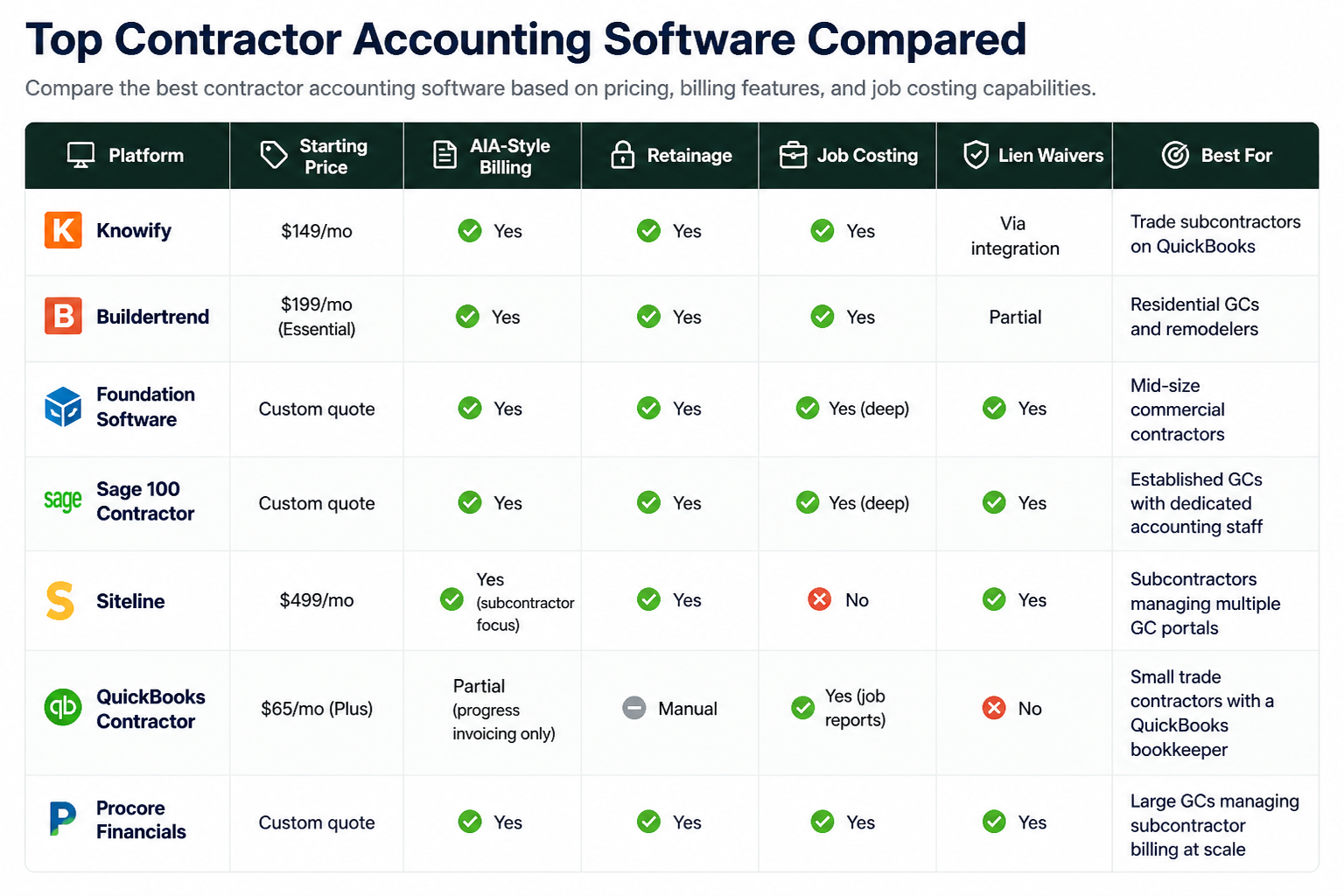
Platform | Starting Price | AIA-Style Billing | Retainage | Job Costing | Lien Waivers | Best For |
|---|---|---|---|---|---|---|
Knowify | $149/mo | Yes | Yes | Yes | Via integration | Trade subcontractors on QuickBooks |
Buildertrend | $199/mo (Essential) | Yes | Yes | Yes | Partial | Residential GCs and remodelers |
Foundation Software | Custom quote | Yes | Yes | Yes (deep) | Yes | Mid-size commercial contractors |
Sage 100 Contractor | Custom quote | Yes | Yes | Yes (deep) | Yes | Established GCs with dedicated accounting staff |
Siteline | $499/mo | Yes (subcontractor focus) | Yes | No | Yes | Subcontractors managing multiple GC portals |
QuickBooks Contractor | $65/mo (Plus) | Partial (progress invoicing only) | Manual | Yes (job reports) | No | Small trade contractors with a QuickBooks bookkeeper |
Procore Financials | Custom quote | Yes | Yes | Yes | Yes | Large GCs managing subcontractor billing at scale |
Use this comparison to evaluate contractor accounting software based on billing workflows, job costing depth, and pricing structure. Choose the platform that aligns with your project scale, financial processes, and operational needs.
QuickBooks Online Plus does include progress invoicing, which allows billing a percentage of a quoted amount across multiple invoices. However, it does not produce G702/G703 pay applications, does not manage a Schedule of Values natively, and handles retainage only through manual workarounds involving deferred revenue accounts. Most QuickBooks-using contractors produce their pay applications in Excel or a dedicated tool, then record the payment in QuickBooks separately. Knowify exists specifically to fill this gap: it sits above QuickBooks, handles the construction billing workflow, and automatically syncs completed invoices and job costs back into QuickBooks.
Firm Type | Annual Revenue | Recommended Platform | Key Reason |
|---|---|---|---|
Solo trade sub (plumbing, electrical, HVAC) | Under $500K | QuickBooks Plus + progress invoicing | Cheapest path; bookkeeper already knows QBO |
Trade subcontractor billing multiple GCs | $500K to $3M | Knowify + QuickBooks | AIA pay apps, retainage, GC portal submission |
Residential GC or remodeler | $1M to $10M | Buildertrend | Project management, scheduling, and billing in one |
Commercial subcontractor managing 20+ GC portals | $3M to $15M | Siteline | Centralises Textura, GCPay, and Procore Pay submissions |
Mid-size commercial GC | $10M to $50M | Foundation Software or Sage 100 Contractor | Full construction accounting, certified payroll, union reports |
Large GC managing subcontractor billing at scale | $50M+ | Procore Financials or Viewpoint Vista | Integrated construction PM, document control, and financials |
No. QuickBooks Online includes progress invoicing (billing a percentage of a quote over time), but it does not produce AIA-style pay applications, manage a Schedule of Values, or calculate retainage automatically. Contractors needing G702/G703 outputs use Knowify, Buildertrend, Foundation Software, Siteline, or Procore Financials, sometimes in combination with QuickBooks for bookkeeping.
Retainage is a percentage (commonly 5 to 10 percent) of each payment withheld by the project owner until the contract is substantially complete. Construction invoicing software tracks retainage per project, per SOV line, and per change order, then produces a retainage release invoice once final acceptance occurs. QuickBooks requires manual journal entries; dedicated construction tools automate the tracking and release.
For a sub billing under $1 million annually with one bookkeeper, QuickBooks Online Plus with progress invoicing handles most needs at $65 per month. Once the firm begins billing commercial GCs who require G702/G703 pay applications, Knowify at $149 per month (syncing back to QuickBooks) is the most practical upgrade path.
A lien waiver is a document signed by a contractor or sub, waiving the right to file a mechanics lien against the property in exchange for payment. Conditional waivers are signed before payment clears; unconditional after. The exact form varies by state (California, Texas, Florida, and Arizona each have statutory forms). Siteline, Foundation Software, and Procore generate state-specific lien waivers and track their status per payment cycle. QuickBooks has no lien waiver capability.
Trade-focused tools start at $149 per month (Knowify) to $199 per month (Buildertrend Essential). Full construction accounting platforms like Foundation Software and Sage 100 Contractor require a custom quote, typically $400 to $1,000 per month plus implementation. Procore Financials is bundled with Procore's construction management platform, which is priced per project or annual volume.
For residential GCs and remodelers, Buildertrend is stronger because it combines project management, scheduling, client communication, and billing in one platform. For trade subcontractors focused on billing commercial GCs, Knowify is more practical: it is purpose-built for AIA pay applications and syncs with QuickBooks rather than replacing it.
Would you pay for invoicing software that fits your workflow? Learn when it is worth paying, what features matter, and how to choose the right tool.
What do you use to manage invoices and track payments? Compare tools, features, and simple ways to stay organized with the right invoicing software.

Find the best free invoicing software for freelancers and small businesses. Compare features, limits, and tools to manage invoices, payments, and clients.

Looking for invoicing software recommendation? Compare top tools, features, pricing, and use cases to manage invoices, payments, and clients with ease.